About This Project
This is a comprehensive task management application designed to help individuals organize, track, and complete their daily tasks efficiently. Built with the robust CodeIgniter 4 PHP framework and styled with the modern Tailwind CSS framework, this application provides a seamless user experience with a clean, responsive interface that works across all devices.
The system features a complete user authentication module that allows users to register new accounts and securely log in to their personalized dashboards. Each user has their own private workspace where they can create, manage, and track their tasks without interference from other users, ensuring data privacy and organization.
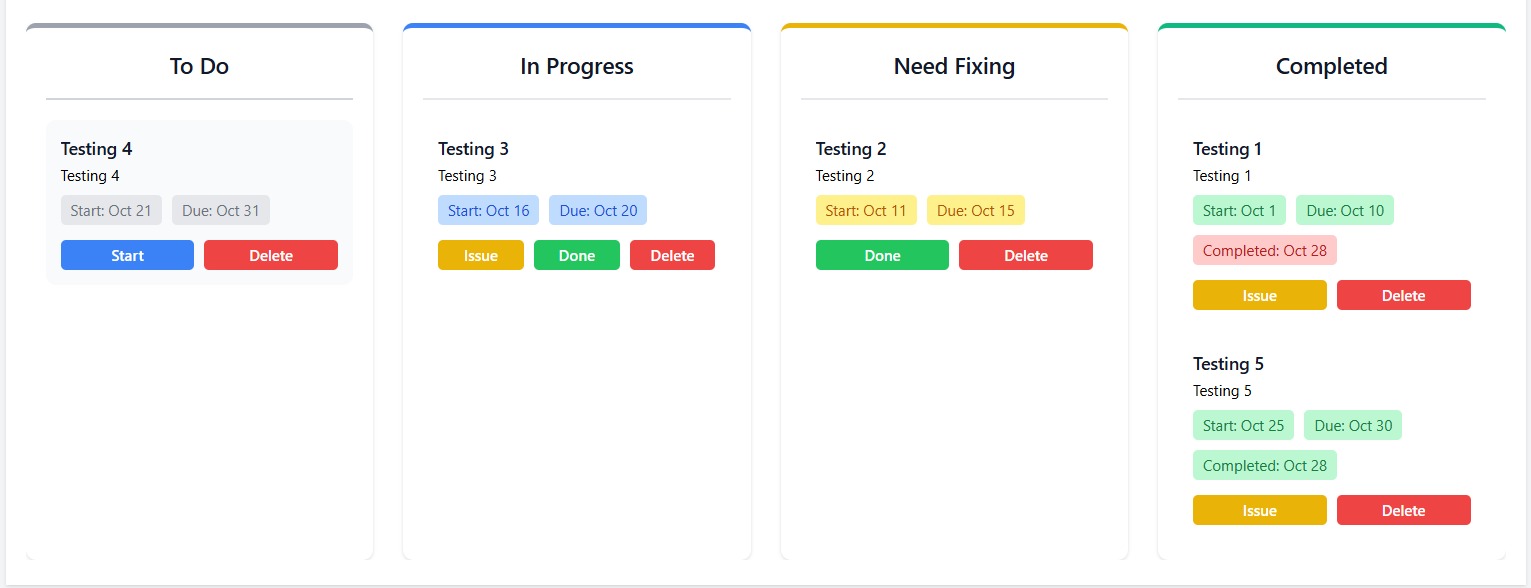
The core functionality revolves around a four-stage task management system that mirrors real-world project workflows:
- To Do: Initial state for newly created tasks
- On Progress: Tasks that are currently being worked on
- Need Fixing: Tasks that require revisions or have encountered issues
- Completed: Finished tasks with automatically recorded completion timestamps
Users can easily move tasks between these statuses using intuitive action buttons, providing a visual representation of their progress. Each task can include a detailed description, along with optional start dates and deadlines to help with time management and planning.
Installation Instructions
Installation Guide
Step 1: Enable SQLite3 Extension
- Open your XAMPP control panel
- Click "Config" button for Apache
- Select "php.ini"
- Find the line: ";extension=sqlite3"
- Remove the semicolon to uncomment it: "extension=sqlite3"
- Save the file
- Restart Apache in XAMPP
Step 2: Navigate to Project Directory
- Open Command Prompt or PowerShell and navigate to the todo-list project:
- cd "C:\Project\Mini Project\todo-list"
Step 3: Install PHP Dependencies
- composer install
Step 4: Install Frontend Dependencies
- npm install
Step 5: Create Environment File
- Copy the example environment file:
- copy .env.example .env
- Or manually create ".env" file in the project root with:
CI_ENVIRONMENT = development
app.baseURL = 'http://localhost:8080/'
app.indexPage = 'index.php'
database.default.hostname = localhost
database.default.database = app
Step 6: Generate Application Key
- php spark key:generate
Step 7: Run Database Migrations
- php spark migrate
This will create the necessary database tables:
- "users" - User accounts
- "todos" - Task items with status tracking
Step 8: Build Tailwind CSS
- npm run build
Note: If the npm build command fails on Windows PowerShell, use Git Bash or Command Prompt instead.
Step 9: Start the Development Server
- php spark serve
The application will be available at: http://localhost:8080
⭐ Project Ratings & Reviews
 RRTutors
"sadasd"