
Python Row-Number Square Pattern: A Guide to Value-Based Nested Loops
While printing stars is common, printing numbers in a grid is the secret to mastering variable tracking in Python. This specific pattern program demonstrates how to print the current row number across an entire line, a fundamental concept for data indexing and report formatting
for y in range(1, 6):
print(x, end="")
print()
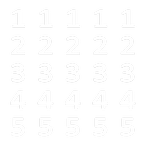
Output:
Step-by-Step Explanation
-
The Role of
x(The Row Value): In this program,xis our "Row Manager." Because we are printingxinside the inner loop, the value only changes when we move to a new row.-
When
xis 1, the inner loop prints "1" five times. -
When
xis 2, the inner loop prints "2" five times.
-
-
The Inner Loop (The Repeater): The loop
for y in range(1, 6):acts as a horizontal repeater. It doesn't care about its own value (y); it simply ensures that whatever is in theprint()statement happens exactly 5 times. -
The
end=""Shortcut: Without this, every single number would print on a new line. By usingend="", we keep the numbers "glued" together horizontally. -
The
print()Reset: Once the inner loop finishes its 5th count, the emptyprint()executes, acting like a "Return" key to start the next row of numbers.
Why This Pattern is Important
This exercise teaches you the difference between static output (stars) and dynamic output (using variables). If you change print(x, end="") to print(y, end=""), you would get a completely different pattern (12345 on every row). Understanding this distinction is vital for any developer.