AOT, JIT - Android Compilation Pipeline
Table of Contents
- Overview and Key Concepts
- Android Runtime (ART)
- Ahead-of-Time (AOT) Compilation
- Just-in-Time (JIT) Compilation
- R8 Compiler
- Comprehensive Comparison
- How They Work Together
- Interview Questions & Answers
1. Overview and Key Concepts
The Android Execution Pipeline
Understanding Android app execution requires knowledge of four distinct but interconnected components:
- R8: Build-time code optimizer and shrinker
- ART (Android Runtime): The runtime environment that executes your app
- AOT (Ahead-of-Time): Compilation strategy used by ART at install time
- JIT (Just-in-Time): Compilation strategy used by ART during app execution
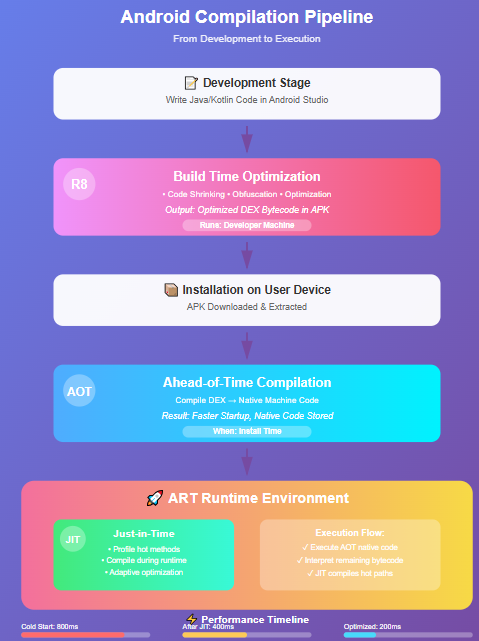
Timeline in Android Development
| Development Time → Build Time → Install Time → Runtime (Code) → (R8) → (AOT) → (JIT) |
Read more about Android R8 Build compiler
 |
2. Android Runtime (ART)
What is ART?
ART is Android's application runtime environment that replaced Dalvik in Android 5.0 (Lollipop). It's responsible for executing your app's bytecode on the device.
Key Features
Garbage Collection:
- Improved GC with reduced pause times
- Concurrent copying GC
- Better memory management
Better Performance:
- Native machine code execution
- Reduced CPU usage
- Faster app startup
Enhanced Debugging:
- Better stack traces
- Improved profiling tools
- Native debugging support
ART vs Dalvik
| Feature | ART | Dalvik (Legacy) |
|---|---|---|
| Compilation | AOT + JIT (Hybrid) | JIT only |
| Installation Time | Longer | Shorter |
| App Startup | Faster | Slower |
| Storage Space | More (native code) | Less |
| Battery Life | Better | Worse |
| Introduced | Android 5.0 | Android 1.0 |
How ART Works
APK Installation
    ↓
DEX bytecode
    ↓
ART analyzes and compiles (AOT)
    ↓
Native machine code stored
    ↓
App Launch - Execute native code
    ↓
JIT compiles hot code paths during runtime
    ↓
Profile-guided optimization
3. Ahead-of-Time (AOT) Compilation
What is AOT?
AOT compilation converts DEX bytecode into native machine code at install time before the app runs.
When AOT Happens
- App Installation: Initial compilation of critical code paths
- Device Idle & Charging: Background optimization of remaining code
- System Updates: Recompilation after OS updates
AOT Compilation Process
// Your Java/Kotlin code
class Calculator {
    fun add(a: Int, b: Int): Int {
        return a + b
    }
}

// After R8: DEX bytecode (simplified)
method add(II)I
    iload_1
    iload_2
    iadd
    ireturn

// After AOT: Native ARM assembly (simplified)
add:
    ADD r0, r0, r1
    BX lr
Advantages of AOT
✅ Faster App Startup
- Code already compiled to native
- No compilation delay at launch
✅ Consistent Performance
- Predictable execution speed
- No runtime compilation overhead
✅ Better Battery Life
- Less CPU usage during execution
- No need for runtime compilation
Disadvantages of AOT
❌ Longer Installation Time
- Compilation happens during install
- Users wait longer to use the app
❌ More Storage Space
- Native code is larger than bytecode
- Increased storage footprint
❌ Less Adaptive
- Cannot optimize based on actual usage patterns
- Fixed optimization strategy
Example: AOT in Action
# During app installation
adb shell cmd package compile -m speed -f com.example.app

# Compilation modes:
# - speed: Full AOT compilation
# - speed-profile: AOT based on profile
# - quicken: Minimal compilation
# - verify: Only verify, no compile
4. Just-in-Time (JIT) Compilation
What is JIT?
JIT compilation converts bytecode into native machine code during runtime as the code is being executed.
When JIT Happens
- First Code Execution: Initial interpretation
- Hot Code Detection: Identifies frequently executed code
- Runtime Optimization: Compiles hot paths to native code
- Profile Building: Collects execution patterns
JIT Compilation Process
App Launches
    ↓
Code interpreted (slower)
    ↓
JIT profiler monitors execution
    ↓
Detects "hot" methods (called frequently)
    ↓
Compiles hot methods to native code
    ↓
Subsequent calls use native code (faster)
    ↓
Profile saved for future AOT optimization
JIT in Android (Modern Hybrid Approach)
Android uses a hybrid JIT + AOT approach since Android 7.0:
Install Time:
- Quick verification
- Minimal compilation

First Run:
- Interpreter executes code
- JIT profiles and compiles hot paths
- Profile data saved

Later Runs:
- AOT uses profile data
- Optimizes frequently used code
- Background compilation during idle
Advantages of JIT
✅ Faster Installation
- No upfront compilation needed
- Apps install quickly
✅ Adaptive Optimization
- Optimizes based on actual usage
- Better performance for user's workflow
✅ Less Storage
- Only compiles what's needed
- Smaller footprint initially
✅ Profile-Guided
- Learns from real usage patterns
- Smarter optimization decisions
Disadvantages of JIT
❌ Slower Initial Startup
- First run requires interpretation
- Compilation happens at runtime
❌ Inconsistent Performance
- Cold code is slower
- Warm-up period needed
❌ CPU and Battery Usage
- Runtime compilation uses resources
- More power consumption initially
Example: JIT Profiling
class ImageProcessor {
    // Called once - stays interpreted
    fun initialize() {
        // Setup code
    }

    // Called thousands of times - JIT compiles this
    fun processPixel(pixel: Int): Int {
        return (pixel * 0.8).toInt()  // Hot path
    }

    // Called rarely - may not be compiled
    fun handleError(error: Exception) {
        // Error handling
    }
}
JIT Decision:
initialize(): Not compiled (called once)processPixel(): Compiled to native (hot method)handleError(): Not compiled (rarely called)
5. R8 Compiler
What is R8?
R8 is a build-time compiler that optimizes your code before it's packaged into an APK. It operates at a completely different stage than AOT/JIT.
R8's Role
Development → R8 (Build Time) → APK → AOT (Install) → JIT (Runtime)
What R8 Does
Code Shrinking:
// Before R8
class UserManager {
    fun getUser() { ... }          // Used
    fun deleteUser() { ... }       // Never called
    fun updateUser() { ... }       // Used
}

// After R8
class a {
    fun a() { ... }               // getUser (renamed)
    // deleteUser removed completely
    fun b() { ... }               // updateUser (renamed)
}
Optimization:
// Before R8
fun calculate(x: Int): Int {
    val temp = x * 2
    return temp + 5
}

// After R8 optimization
fun a(x: Int): Int {
    return x * 2 + 5  // Inlined and optimized
}
Obfuscation:
// Before R8
package com.example.myapp;
class PaymentProcessor {
    fun processPayment() { ... }
}

// After R8
package a.b.c;
class a {
    fun a() { ... }
}
R8 vs AOT/JIT
R8 is NOT a runtime compiler:
- R8: Works on source code → produces DEX bytecode
- AOT/JIT: Work on DEX bytecode → produce native machine code
6. Comprehensive Comparison
Comparison Table
| Aspect | R8 | AOT | JIT | ART |
|---|---|---|---|---|
| What is it? | Build-time optimizer | Install-time compiler | Runtime compiler | Runtime environment |
| When it runs | During app build | During app install | During app execution | Always (when app runs) |
| Input | Java/Kotlin source | DEX bytecode | DEX bytecode | DEX + Native code |
| Output | Optimized DEX | Native machine code | Native machine code | Executes code |
| Purpose | Reduce size, obfuscate | Faster startup | Adaptive optimization | Execute app |
| Developer control | ProGuard rules | Minimal | None | None |
| Impact on user | Smaller download | Longer install time | First-run slower | Overall experience |
| Runs on | Developer machine | User device | User device | User device |
| Storage impact | Reduced APK size | Increased storage | Minimal | Manages both |
Timeline Visualization
┌─────────────────────────────────────────────────────────────┐
│ DEVELOPMENT PHASE                                            │
│ Developer writes Java/Kotlin code                           │
└─────────────────────────────────────────────────────────────┘
                        ↓
┌─────────────────────────────────────────────────────────────┐
│ BUILD PHASE (R8)                                            │
│ • Code shrinking                                            │
│ • Optimization                                              │
│ • Obfuscation                                               │
│ Output: Optimized DEX bytecode in APK                       │
└─────────────────────────────────────────────────────────────┘
                        ↓
┌─────────────────────────────────────────────────────────────┐
│ INSTALLATION PHASE (ART + AOT)                              │
│ • APK installed on device                                   │
│ • ART performs AOT compilation                              │
│ • Critical paths compiled to native code                    │
│ Output: Native machine code stored on device                │
└─────────────────────────────────────────────────────────────┘
                        ↓
┌─────────────────────────────────────────────────────────────┐
│ RUNTIME PHASE (ART + JIT)                                   │
│ • App launches                                              │
│ • ART executes native code (from AOT)                       │
│ • ART interprets remaining bytecode                         │
│ • JIT compiles hot methods during execution                 │
│ • JIT saves profile for future AOT optimization             │
└─────────────────────────────────────────────────────────────┘
7. How They Work Together
The Complete Android Compilation Pipeline
// 1. You write code
class UserRepository {
    fun fetchUser(id: String): User {
        val response = api.getUser(id)
        return response.toUser()
    }
}

// 2. R8 optimizes at build time
// - Removes unused code
// - Inlines small methods
// - Obfuscates names
// Result: Smaller, optimized DEX bytecode in APK

// 3. User installs app
// AOT (via ART) compiles critical paths:
// - App startup code
// - Main Activity initialization
// Result: Native code for fast startup

// 4. User runs app
// ART runtime environment:
// - Executes AOT-compiled code (fast)
// - Interprets remaining bytecode (slower)
// - JIT profiles execution patterns

// 5. User calls fetchUser() repeatedly
// JIT (via ART) detects hot method:
// - Compiles fetchUser() to native code
// - Future calls execute native version
// - Saves profile data

// 6. Next day (device idle & charging)
// Background AOT optimization:
// - Uses JIT profile data
// - Compiles frequently used methods
// - Next app launch is even faster
Real-World Example
Scenario: Photo editing app
class PhotoEditor {
    // Called once at startup
    fun initialize() {
        loadResources()
        setupUI()
    }

    // Called for every pixel in image (millions of times)
    fun applyFilter(pixel: Int, filter: Filter): Int {
        return when(filter) {
            Filter.SEPIA -> applySepia(pixel)
            Filter.GRAYSCALE -> applyGrayscale(pixel)
        }
    }

    // Rarely called
    fun exportToPDF(image: Bitmap) {
        // Complex export logic
    }
}
What happens:
-
R8 (Build time):
- Removes unused export formats
- Inlines small helper methods
- Shrinks APK from 25MB to 15MB
-
AOT (Install time):
- Compiles
initialize()for fast startup - Partially compiles
applyFilter() - Skips
exportToPDF()(rarely used)
- Compiles
-
JIT (First run):
- User edits photos
applyFilter()called millions of times- JIT detects hot method → compiles to native
- Saves profile: "applyFilter is critical"
-
Background AOT (Device idle):
- Uses JIT profile
- Fully AOT-compiles
applyFilter() - Next launch: immediate native execution
Result:
- First launch: Fast startup (AOT)
- During use: Gradually speeds up (JIT)
- Subsequent launches: Fully optimized (Profile-guided AOT)
8. Interview Questions & Answers
Q1: What is the difference between R8 and ART?
Answer:
R8 and ART operate at completely different stages:
R8:
- When: Build time (on developer's machine)
- What: Optimizes source code → produces DEX bytecode
- Purpose: Reduce APK size, obfuscate code, remove unused code
- Runs on: Developer's build machine
ART:
- When: Runtime (on user's device)
- What: Executes DEX bytecode
- Purpose: Run the application
- Runs on: User's device
Example:
Developer Machine:        User Device:
Source Code               APK installed
     ↓                         ↓
    R8                       ART
     ↓                         ↓
DEX in APK  →  Download  →  Execute
Q2: Explain the difference between AOT and JIT compilation.
Answer:
AOT (Ahead-of-Time):
- Compiles code before execution (at install time)
- Pros: Faster startup, consistent performance
- Cons: Longer install time, more storage
JIT (Just-in-Time):
- Compiles code during execution (at runtime)
- Pros: Adaptive optimization, faster install
- Cons: Slower initial execution, warm-up period needed
Example:
class MathCalculator {
    fun complexCalculation(x: Int): Int {
        return x * x + 2 * x + 1
    }
}

// AOT approach:
// Install time: Compiles to native code
// First call: Executes native code (fast)
// Subsequent calls: Executes native code (fast)

// Pure JIT approach:
// Install time: No compilation
// First call: Interprets bytecode (slow)
// After many calls: Compiles to native code
// Subsequent calls: Executes native code (fast)

// Android's Hybrid (JIT + AOT):
// Install time: Minimal compilation
// First run: JIT profiles usage
// Background: AOT compiles based on profile
// Result: Best of both worlds
Q3: How does Android's hybrid compilation model work?
Answer:
Since Android 7.0, Android uses a hybrid JIT + AOT approach that combines the benefits of both:
Stage 1 - Installation:
- Fast installation (minimal compilation)
- Basic verification only
- App ready to use quickly
Stage 2 - First Run (JIT):
- Interpreter executes code
- JIT compiler profiles execution
- Hot methods compiled to native code
- Profile data saved to disk
Stage 3 - Background Optimization (Profile-Guided AOT):
- Device is idle and charging
- AOT uses saved profile data
- Compiles frequently-used code paths
- Native code stored for future use
Stage 4 - Subsequent Runs:
- Execute pre-compiled native code (fast)
- Fall back to interpreter for cold code
- JIT continues to profile and optimize
Example:
class GameEngine {
    // First launch: Interpreted
    // After profiling: JIT compiled
    // After background AOT: Native code ready
    fun updateFrame() {
        renderGraphics()
        updatePhysics()
        processInput()
    }
}
Benefits:
- ✅ Fast installation
- ✅ Fast first run (after warm-up)
- ✅ Optimal long-term performance
- ✅ Adaptive to user behavior
Q4: When would you prefer full AOT compilation over the hybrid model?
Answer:
Full AOT compilation is preferred in specific scenarios:
Use Cases for Full AOT:
-
Performance-Critical Apps:
- Gaming apps
- Video/audio processing
- Real-time applications
-
Enterprise/Business Apps:
- Predictable performance required
- Consistent user experience
- No warm-up period acceptable
-
Security-Sensitive Apps:
- Banking applications
- Payment processors
- Medical apps
Example Configuration:
# Force full AOT compilation
adb shell cmd package compile -m speed -f com.example.app

# Different compilation modes:
# speed: Full AOT (maximum performance)
# speed-profile: Profile-guided AOT (default)
# quicken: Minimal compilation (fastest install)
Trade-offs:
Full AOT:
+ Fastest execution from first launch
+ No runtime compilation overhead
+ Predictable performance
- Longer installation time
- More storage space
- Less adaptive to usage patterns

Hybrid:
+ Fast installation
+ Adaptive optimization
+ Less storage initially
- Slower initial execution
- Warm-up period required
Q5: How does R8 affect AOT and JIT compilation?
Answer:
R8 indirectly affects AOT/JIT by optimizing the input they receive:
R8's Impact:
-
Smaller DEX bytecode:
- Less code for AOT to compile
- Faster compilation times
- Less storage needed
-
Optimized code structure:
- Better inlining opportunities
- Simpler control flow
- Easier for AOT/JIT to optimize further
-
Removed dead code:
- AOT/JIT only process code that's actually used
- More efficient compilation
Example:
// Before R8 (original code)
class Calculator {
    fun add(a: Int, b: Int): Int = a + b
    fun subtract(a: Int, b: Int): Int = a - b
    fun multiply(a: Int, b: Int): Int = a * b
    fun divide(a: Int, b: Int): Int = a / b  // Never used

    companion object {
        const val VERSION = "1.0"  // Never used
    }
}

// After R8 shrinking and optimization
class a {
    fun a(a: Int, b: Int): Int = a + b
    fun b(a: Int, b: Int): Int = a - b  // Inlined at call sites
    fun c(a: Int, b: Int): Int = a * b
    // divide() removed
    // VERSION removed
}

// Impact on AOT/JIT:
// - 25% less code to compile
// - Simpler code structure
// - Faster compilation
// - Better optimization opportunities
Q6: What happens to an Android app from development to execution?
Answer:
Complete lifecycle with all components:
┌────────────────────────────────────────────┐
│ 1. DEVELOPMENT                             │
│ Developer writes Java/Kotlin code          │
│ Tools: Android Studio, Kotlin compiler     │
└────────────────────────────────────────────┘
                    ↓
┌────────────────────────────────────────────┐
│ 2. BUILD (R8)                              │
│ • Compile source to bytecode               │
│ • R8 shrinks and optimizes                 │
│ • Generate DEX bytecode                    │
│ • Package into APK                         │
│ Output: Optimized APK (15MB → 10MB)        │
└────────────────────────────────────────────┘
                    ↓
┌────────────────────────────────────────────┐
│ 3. DISTRIBUTION                            │
│ Upload to Play Store                       │
│ User downloads APK                         │
└────────────────────────────────────────────┘
                    ↓
┌────────────────────────────────────────────┐
│ 4. INSTALLATION (ART + AOT)                │
│ • Extract APK contents                     │
│ • Verify DEX files                         │
│ • AOT compiles critical paths              │
│ • Store native code                        │
│ Time: ~10-30 seconds                       │
└────────────────────────────────────────────┘
                    ↓
┌────────────────────────────────────────────┐
│ 5. FIRST LAUNCH (ART Runtime)              │
│ • ART loads app                            │
│ • Execute AOT-compiled code (fast)         │
│ • Interpret remaining bytecode             │
│ • JIT monitors execution                   │
│ • JIT compiles hot methods                 │
│ • Save profile data                        │
└────────────────────────────────────────────┘
                    ↓
┌────────────────────────────────────────────┐
│ 6. BACKGROUND OPTIMIZATION                 │
│ (Device idle & charging)                   │
│ • Read JIT profile                         │
│ • AOT compiles frequently-used code        │
│ • Native code ready for next launch        │
└────────────────────────────────────────────┘
                    ↓
┌────────────────────────────────────────────┐
│ 7. SUBSEQUENT LAUNCHES                     │
│ • Fully optimized execution                │
│ • Native code for hot paths                │
│ • Optimal performance                      │
└────────────────────────────────────────────┘
Q7: How can developers optimize for the AOT/JIT compilation model?
Answer:
Best Practices:
- Keep Methods Small:
// Bad: Large method, hard to optimize
fun processData(data: List) {
    // 100+ lines of code
    // Complex logic
    // Multiple responsibilities
}

// Good: Small, focused methods
fun processData(data: List) {
    val filtered = filterData(data)
    val transformed = transformData(filtered)
    return saveData(transformed)
}
// Easier for JIT to compile
// Better inlining opportunities
- Avoid Reflection in Hot Paths:
// Bad: Reflection in frequently-called method
fun processItem(item: Any) {
    val method = item.javaClass.getMethod("process")
    method.invoke(item)  // JIT cannot optimize
}

// Good: Direct calls
fun processItem(item: Processable) {
    item.process()  // JIT can optimize
}
- Use R8 Optimization:
// Enable full R8 optimization
android {
    buildTypes {
        release {
            minifyEnabled true
            shrinkResources true
            proguardFiles getDefaultProguardFile(
                'proguard-android-optimize.txt'
            )
        }
    }
}
- Profile-Guided Optimization:
# Generate baseline profile for AOT
./gradlew :app:generateBaselineProfile

# This tells AOT which methods to prioritize
Q8: What are the implications of the compilation model for app performance?
Answer:
Performance Characteristics:
Cold Start (First Launch):
Time breakdown:
- Load APK: 50ms
- ART initialization: 100ms
- Execute AOT code: 200ms (fast)
- Interpret remaining: 300ms (slow)
- JIT compilation: 150ms
Total: ~800ms
Warm Start (After JIT profiling):
Time breakdown:
- Load cached state: 50ms
- Execute native code: 300ms (faster)
- Minimal interpretation: 50ms
Total: ~400ms (50% faster)
Hot Start (After background AOT):
Time breakdown:
- Resume from background: 50ms
- Execute optimized native: 150ms (fastest)
Total: ~200ms (75% faster)
Example Impact:
class ImageFilter {
    // First run: 100ms (interpreted)
    // After JIT: 20ms (native)
    // After background AOT: 15ms (optimized native)
    fun applyFilter(image: Bitmap): Bitmap {
        // Heavy processing
    }
}
Optimization Strategy:
- Use baseline profiles for critical paths
- Minimize cold start code
- Warm up important features early
- Monitor performance with Android Profiler
Summary
Key Takeaways
- R8 = Build-time optimizer (shrinks, optimizes, obfuscates)
- ART = Runtime environment (executes your app)
- AOT = Compile at install time (faster startup)
- JIT = Compile during runtime (adaptive optimization)
The Complete Picture
Your Code
    ↓
  [R8] ← Build time optimization
    ↓
DEX Bytecode
    ↓
  [AOT] ← Install time compilation
    ↓
Native Code + Bytecode
    ↓
  [ART] ← Runtime environment
    ↓
  [JIT] ← Runtime optimization
    ↓
Optimized Execution
Modern Android (Hybrid Approach)
Android combines all these technologies to provide:
- ✅ Fast installation
- ✅ Good first-run performance
- ✅ Excellent long-term performance
- ✅ Efficient storage use
- ✅ Adaptive optimization
Understanding how these components work together helps you write better-performing Android apps and make informed optimization decisions.